
Business Workflow Automation: Turn Documents into Faster, Controlled Processes

Jun 19, 2026



Australian organisations have digitised large volumes of invoices, forms and operational records. Yet many teams still re-key information, compare documents manually, investigate discrepancies and chase approvals across multiple systems.

The problem is no longer document storage. It is the gap between stored information and the business rules required to act on it. Business workflow automation closes that gap by turning documents into structured, validated and workflow-ready data so routine transactions can move efficiently while genuine exceptions receive human review.
A document management system stores, organises, governs and retrieves files. It is an important system of record, but storing a document does not automatically move the business process forward.
Document-driven operations usually involve three layers:
Layer | Primary responsibility | Output |
Document management | Store, govern and retrieve documents | Controlled files and metadata |
Document processing | Classify documents and extract information | Structured data |
Workflow automation | Match, validate, route and trigger actions | Validated data and auditable process state |
A document management system handles the first layer well, but employees may still need to enter invoice data into an ERP, compare documents, investigate discrepancies and determine who should act next.
This is where business process automation and workflow logic become important. The goal is not simply to ask, “What information appears in this document?” but, “Is this information consistent with the transaction, our systems and our rules — and what should happen next?”
Business workflow automation connects data, rules, systems and people through a controlled sequence of steps.
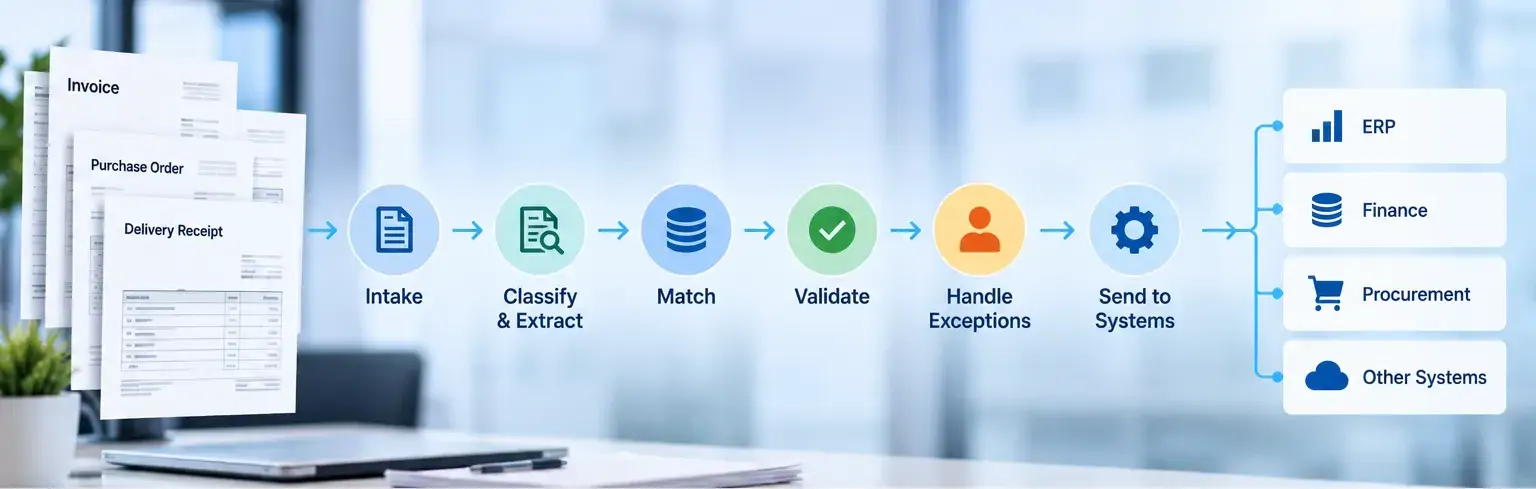
1. Intake
Documents are received through authorised channels, linked to a transaction and preserved in their original form. A transaction identifier should follow the document through the workflow for traceability.
2. Classification and Extraction
The system identifies the document type and extracts required information such as supplier details, invoice numbers, purchase order references, quantities, tax and totals.
Extraction should also retain enough confidence and context for downstream decisions.
3. Matching
Extracted information is compared with related documents or system records, such as purchase orders, goods receipt records, supplier master data or ERP records.
Matching gives document fields transaction context and helps separate routine transactions from genuine exceptions.
4. Validation
Business rules determine whether the transaction can proceed. These may include tolerance thresholds, duplicate checks, supplier validation, required fields and approval policies.
Validation should reflect risk. Uncertainty in a low-risk descriptive field may not require the same treatment as uncertainty in payment details or transaction amounts.
5. Exception Handling
Incomplete or inconsistent transactions should be routed into a structured review process. The workflow should identify the specific mismatch, show the relevant evidence and record the resolution.
This keeps human attention focused on cases where judgement or accountability is required.
6. System Handoff
Once the required controls are satisfied, validated data can move to the next approval stage or downstream system. Handoffs should preserve transaction identifiers, validation status and error information, while failed integrations should be retryable without creating duplicates.
Three-way invoice matching is a practical business process automation example because it combines documents, system records and control rules in one decision flow.
The workflow compares the supplier invoice, purchase order and goods receipt record. It can check supplier identity, quantities, prices, tax, totals and defined tolerances.
If the transaction matches, it can move to the next control or approval stage. A successful match does not automatically authorise payment; approval limits, segregation of duties and access controls still apply.
If an exception is found, the workflow should identify the issue and route it to the appropriate person with supporting evidence. In this way, business process automation reduces unnecessary review without removing human judgement where policy, uncertainty or risk requires it.
The business case for business workflow automation should focus on measurable improvements in workflow performance rather than the number of automated steps.
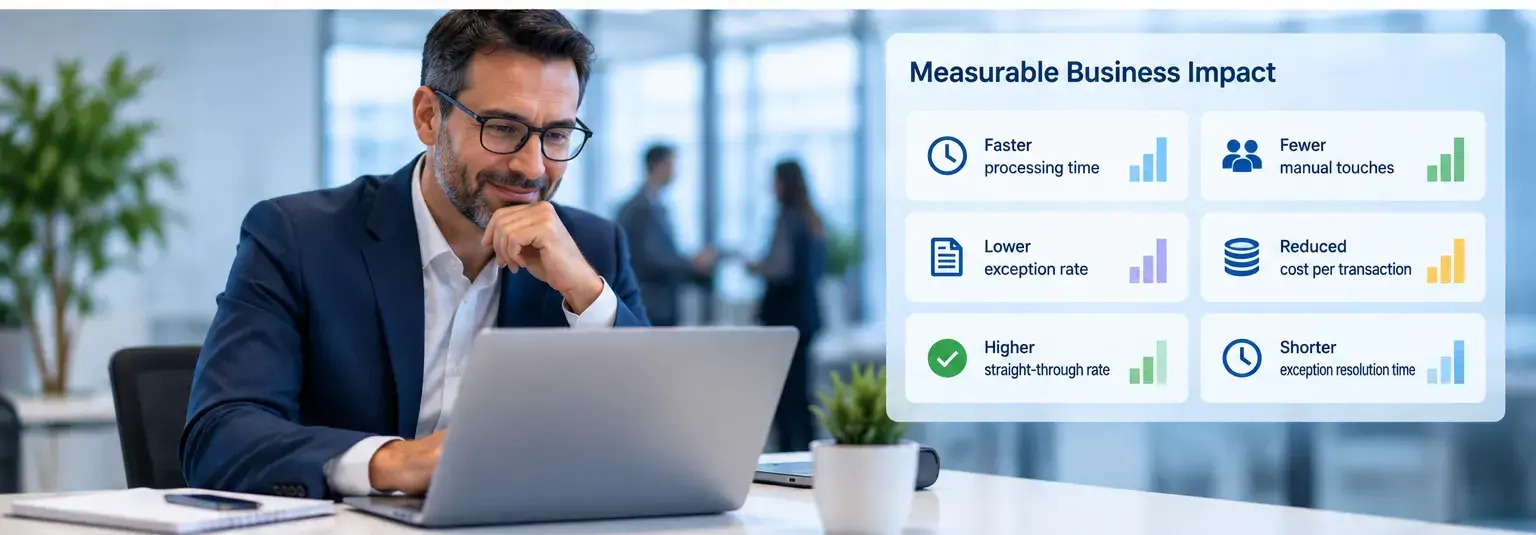
Useful KPIs include:
KPI | What it reveals |
Average processing time | End-to-end workflow speed |
Manual touches per transaction | Remaining manual effort |
Exception rate | Share requiring review |
Cost per transaction | Unit economics |
Straight-through processing rate | Share completed without manual intervention |
Exception resolution time | Effectiveness of human review |
These measures should be compared with a pre-implementation baseline. A higher straight-through processing rate has limited value if exception resolution slows or control quality declines.
The objective is a better balance between automated processing, human review and reliable controls.
KPS Document Intelligence, powered by T-DocAgent, helps organisations move beyond document extraction by validating data, applying business rules and preparing trusted information for downstream workflows. It can work alongside an existing document management system, ERP or financial platform rather than replacing core systems.
A KPS case study in B2B commerce shows how this works in practice. The client managed a high volume of purchase orders, supplier invoices and payment-related documents, but manual review created processing bottlenecks, data-entry errors and difficulty handling different document layouts. KPS applied DocAgent to extract structured data, validate transactions against business logic and prepare verified financial information for downstream accounts payable processes.
The result was faster invoice and order handling, less manual verification and more consistent matching between invoices and related agreements. Staff could focus on exceptions instead of repeatedly checking routine transactions, showing how document intelligence can support more scalable business workflow automation.
See How KPS Streamlined Invoice Processing and Document Verification in B2B Commerce
When evaluating a business process automation solution for document-driven workflows, assess the complete operating process rather than extraction accuracy alone.
Testing should cover representative documents, required fields, matching logic, configurable rules, exception routing, human review, ERP or financial-system integration, duplicate handling and expected production volumes.
A proof of concept should use realistic documents, actual rules and known exception scenarios. Success should be measured against baseline KPIs such as processing time, manual touches, exception rates and straight-through processing.
Security and governance should also be built into the design. Relevant controls include least-privilege access, encryption, audit logging, data retention and environment separation. ISO/IEC 27001 provides requirements for information security management [1], while organisations subject to the GDPR should also consider data minimisation, storage limitation, integrity and accountability [2].
The key question is whether the complete business process automation workflow can operate reliably under real business conditions.
Enterprise automation does not need to begin with a large transformation programme.
A strong starting point is a workflow with meaningful transaction volume, repeated manual effort, clear business rules, identifiable exceptions and measurable performance.
Three-way invoice matching can suit high-volume accounts payable environments, but it will not be the right first workflow for every organisation.
Before implementation, define the required documents, matching rules, tolerance levels, exception owners, target systems and baseline KPIs. Where a document management system already holds source records, define how it will interact with the automation and downstream platforms.
Deployment can then progress gradually:
Observe → Process in parallel → Enable selected automated paths → Measure → Expand
This allows the organisation to validate speed, control and exception handling before extending business workflow automation into a broader process.
Digitisation makes documents accessible, but accessibility alone does not improve how work moves through the business. The real value of business workflow automation comes when document data can be validated against business rules, connected with existing systems and moved into the next action with clear controls.
In our view, the goal should not be to automate every transaction. It should be to automate the routine work that follows predictable rules, while directing exceptions, uncertainty and higher-risk decisions to the right people. This creates a more practical balance between speed, control and accountability.
Because every organisation has different document types, approval structures, tolerance rules and system environments, effective automation should be tailored around the way the business already operates rather than forcing teams into a fixed workflow.
KPS Solutions can help identify where document-driven processes create the most friction, map the rules and exception paths behind them, and design a document-intelligence layer that works with the systems already in place.
Explore KPS Document Intelligence to see how validated document data can become part of a more controlled, scalable workflow.
What is business workflow automation?
Business workflow automation uses technology to coordinate repeatable workflow steps such as data capture, matching, validation, routing, exception handling and system handoff. It can combine automated decisions with accountable human review where risk or policy requires it.
How is it different from a document management system?
A document management system stores, governs and retrieves files. Workflow automation uses information from those documents to apply rules, make routing decisions and trigger process steps.
The two can work together: the document management system remains the controlled repository while the workflow layer coordinates decisions and actions.
How does it differ from business process automation?
Business process automation generally refers to automation across a broader end-to-end process. Workflow automation focuses more specifically on the sequence of tasks, decisions, rules and hand-offs within that process. In practice, business process automation and workflow automation often overlap.
Can it integrate with an existing ERP or financial system?
Yes, where the target architecture, APIs, data formats and security controls support the integration. A well-designed integration should preserve transaction identifiers, validation status, error handling and audit evidence, while clearly defining the role of any existing document management system.
When should a workflow require human review?
Human review is appropriate when a transaction falls outside defined rules, contains material uncertainty, requires judgement or is subject to an approval policy.
References
[1] International Organization for Standardization — ISO/IEC 27001:2022: Information Security Management Systems.
[2] European Commission — Principles of Personal Data Processing under the GDPR.


Table of content

Related Insights

Enterprise Data Management: Building a Unified Data Foundation
Discover how enterprise data management helps organisations connect fragmented data, build a unified data foundation, and support better business decisions....

How to Choose an Enterprise Data Platform That Fits Your Business
Explore how enterprises can choose a data platform that fits industry requirements, existing infrastructure, and business needs while supporting faster deployment....
AI Process Automation for Australian Enterprises: Key Use Cases
Explore key AI process automation use cases for Australian enterprises and how AI can streamline operations, improve productivity, and scale business processes. ...

Let’s build what’s next for your business
Tell us about your business challenges, we’ll help you shape the right solution.

